How to request for manual withdrawal
1.THB Withdrawal
✅ Required Documents
-
Asset Withdrawal Request Form, please review correctness and completeness of the form before sending
The form can be downloaded at: KCTH_Asset Withdrawal Form (หนังสือขอถอนสินทรัพย์)
-
Copy of Thai ID card (for Thai nationals) / Passport (for foreigners), signed to certify true copy
-
Copy of bank book page with the account name matching your KuCoin Thailand account
Please submit the documents to Customer Support via email at happy@kucoin.th
Subject: “Asset Withdrawal Request”
✍️ How to Complete the Form (THB)
1. Personal Information
-
Full name → Must match your KuCoin Thailand account
-
ID card number / Passport
-
Email → Must be the email registered with KuCoin Thailand
-
Phone number
2. Withdrawal Details
-
Asset type → “THB”
-
Withdrawal amount
3. Bank Account Details
-
Bank name
-
Account name → Must match your KuCoin Thailand account
-
Account number
4. Declaration / Signature
-
Signature
-
Date
2. Digital Assets Withdrawal (DA)
✅ Required Documents
-
Asset Withdrawal Request Form, completed accurately and in full*
The form can be downloaded at: KCTH_Asset Withdrawal Form (หนังสือขอถอนสินทรัพย์)
-
Copy of Thai ID card (for Thai nationals) / Passport (for foreigners), signed to certify true copy
-
Destination wallet address
-
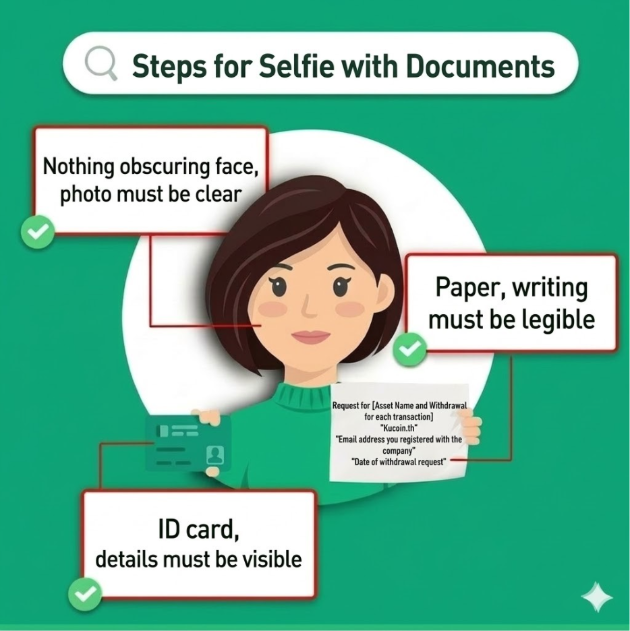
Selfie holding a paper specifying required information and ID card/passport
* In case the submitted form is a scanned document or photo, customers are required to also attach the Asset Withdrawal Request Form in Word format (.docx) to prevent errors in wallet address entry by staff
Please submit the documents to Customer Support via email at happy@kucoin.th
Subject: “Asset Withdrawal Request”
✍️ How to Fill the Form (DA)
1. Personal Information
-
Full name → Must match your KuCoin Thailand account
-
ID / Passport number
-
Email → Must be the email registered with KuCoin Thailand
-
Phone number
2. Withdrawal Details
-
Asset type: Specify coin name (e.g., BTC, ETH)
-
Amount
3. Destination Wallet Address
-
Enter the wallet address (must be typed in word file only)
-
Must be the customer’s own wallet
Please note: The Company has no policy of requesting your password or private key under any circumstances. Please keep such information strictly confidential.
4. Declaration / Signature
-
Signature
-
Date
Example of selfie holding a paper and ID card / passport